

How To Program HomeLink Garage Door Opener

Supreme Garage Door Repair
Apr 3, 2024
Read 8 min

Learning to program your HomeLink garage door opener is simple. HomeLink lets many vehicles operate compatible garage door openers without using a handheld remote. Setup usually starts inside the vehicle and may need a second step at the opener motor.

The exact process can vary by vehicle and opener model. Check your vehicle owner's manual first and review the instructions for your garage door opener. If your opener or controls are not working correctly, Supreme Garage Door Repair can help homeowners throughout Dallas-Fort Worth and North Texas.

HomeLink garage door opener programming and remote signal inspection

What Is HomeLink?

HomeLink is a built-in wireless control system found in many vehicles. The buttons may be on the rearview mirror, overhead console, visor, or another panel depending on the vehicle.

Once programmed, HomeLink can operate a compatible garage door opener without requiring a separate remote inside the vehicle.

HomeLink works with many garage door opener systems, including standard and rolling-code models. Compatibility still depends on the vehicle, opener, frequency, and technology.

If you are having problems with your opener, Supreme provides professional garage door services for opener, remote, sensor, and related garage door problems.

Before You Program HomeLink

Park the vehicle outside the garage before you begin. Keep people, pets, vehicles, tools, and other objects clear of the garage door because the door may move during programming.

Have the original handheld garage door remote nearby. Make sure it has a strong battery so it can send a clear signal to the vehicle.

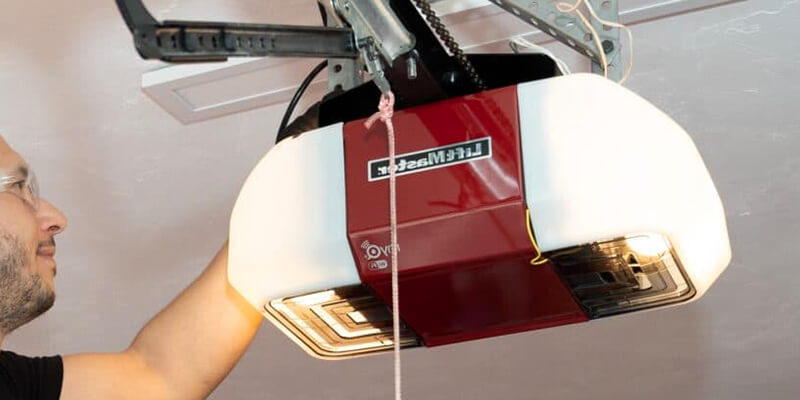
Find the HomeLink buttons in your vehicle. Next, locate the Learn, Smart, or Program button on the garage door opener motor. You may need this button later if your opener uses rolling-code technology.

Safety tip: Do not hold the opener's Learn button unless the manufacturer's instructions tell you to. Holding it too long on some openers can erase stored remotes, keypads, and other accessories.

How To Program HomeLink Garage Door Opener Step by Step

The following process works for many HomeLink-equipped vehicles and compatible garage door openers. Your vehicle may use different steps, so follow the owner's manual when its instructions differ.

1. Prepare the HomeLink Button

Choose the HomeLink button that you want to use for the garage door.

If HomeLink already has other devices programmed, do not clear the entire system unless you want to remove those settings or your vehicle instructions specifically tell you to.

2. Hold the Garage Door Remote Near HomeLink

Hold the original handheld garage door remote close to the HomeLink controls.

Press and hold the HomeLink button you chose. At the same time, press the button on the handheld garage door remote.

Watch the HomeLink indicator light. The light should change as the vehicle learns the signal from the original remote. Release the buttons when the indicator shows the signal has been learned.

Technician checking garage door opener controls during HomeLink programming

3. Test the HomeLink Button

Press and release the HomeLink button you programmed.

If the garage door responds, the basic programming process may be complete.

If the indicator changes but the door does not open, the opener may use rolling-code technology. In that case, you may need to complete the Learn-button process at the opener.

If you need help with pairing or compatibility, Supreme can inspect and service garage door opener remotes and controls.

How To Program HomeLink Garage Door Opener With Rolling Code

Many modern garage door openers use rolling-code security. The security code changes during normal use, so HomeLink may need an extra synchronization step.

Locate the Learn, Smart, or Program button on the garage door opener motor. It is often on the side or back of the motor unit and may be near the antenna or behind a light cover.

Press and release the Learn or Program button according to the opener manufacturer's instructions.

Return to the vehicle promptly. Press and release the HomeLink button you programmed. Some systems may require more than one press before pairing is complete.

Test the garage door after programming.

Why Won't My HomeLink Program?

If HomeLink does not connect, it does not always mean something is broken. Small setup or compatibility issues can prevent successful programming.

  • A weak battery in the original handheld remote
  • Holding the remote too far from the HomeLink controls
  • An incompatible vehicle and opener combination
  • An incomplete rolling-code setup
  • Waiting too long after pressing the opener's Learn button
  • Signal interference
  • A problem with the opener's receiver or control board
  • Using the wrong programming process for the vehicle or opener

Try the programming process again and follow the vehicle owner's manual closely.

If several remotes and controls stop working, the problem may be with the opener rather than HomeLink. Supreme's garage door opener repair service can help diagnose receiver, control-board, antenna, and opener problems.

Technician testing programmed HomeLink garage door opener

Does HomeLink Work With Every Garage Door Opener?

No. HomeLink works with many garage door openers, but it will not work with every opener, vehicle, or equipment generation.

Older openers may use different frequencies or control technology. Some newer systems may also have special programming requirements.

Before replacing anything, check the opener model, vehicle model year, HomeLink system, and original remote.

Homeowners considering newer connected controls can also review Supreme's guide to smart garage door openers.

What If HomeLink Was Working and Suddenly Stopped?

A HomeLink button may stop operating the garage door for several reasons.

First, test the regular handheld remote. If the handheld remote also fails, the problem is more likely with the garage door opener, receiver, power supply, or stored programming.

If the regular remote works but HomeLink does not, try programming the HomeLink button again and follow the vehicle owner's manual.

Also check whether the opener's stored codes were recently cleared. Clearing opener memory can remove previously paired controls and require them to be programmed again.

Should You Clear HomeLink Before Selling a Vehicle?

Clearing your HomeLink buttons is a smart security step before selling, trading, or returning a vehicle.

Stored HomeLink programming may allow the vehicle to operate a garage door that was previously connected to it.

Follow the vehicle owner's manual for the correct clearing procedure. You may also want to review the garage door opener's stored controls and remove access you no longer need.

HomeLink Garage Door Opener Help in North Texas

Knowing how to program HomeLink garage door opener controls can fix many connection issues. However, programming will not repair a damaged opener, receiver, control board, or antenna.

Supreme Garage Door Repair works with garage door openers, remotes, keypads, sensors, receivers, and related controls throughout Dallas-Fort Worth.

Homeowners in Tarrant County can also learn more about garage door repair in Fort Worth, TX.

Frequently Asked Questions About HomeLink Garage Door Openers

To program HomeLink, place the original handheld remote near the HomeLink buttons and train the selected button using the remote. Test it afterward. If your opener uses rolling-code technology, you may also need to press the Learn or Program button on the opener and then complete the pairing from the vehicle.

For many HomeLink setups, the original handheld remote is used to teach the vehicle the garage door opener signal. Some systems use a different process, so check the instructions for your specific vehicle and opener.

HomeLink buttons are commonly located on the rearview mirror, overhead console, visor, or another interior control panel. The exact location depends on the vehicle make, model, and year.

A flashing indicator may mean HomeLink learned the remote signal but still needs to be synchronized with a rolling-code opener. It can also point to incomplete programming or a compatibility issue.

The Learn, Smart, or Program button is normally found on the garage door opener motor unit. It may be on the side or back of the opener or behind a light cover. The location and button color vary by manufacturer.

Once HomeLink is successfully programmed to a compatible opener, it can usually operate the garage door without the handheld remote. Keeping the original remote may still be useful for backup access, future programming, or troubleshooting.

Resetting or clearing the garage door opener's memory can remove stored controls. If that happens, HomeLink may need to be paired with the opener again.

Conclusion: Test HomeLink After Programming

Learning how to program HomeLink garage door opener controls is usually straightforward when the vehicle and opener are compatible.

Start with the original remote, train the HomeLink button, and complete the Learn-button step if your opener uses rolling code. Always test the garage door afterward and keep the door area clear while programming.

If HomeLink still will not connect, check the original remote and opener before assuming the vehicle is the problem.

Need Help Programming Your HomeLink Garage Door Opener?

If you followed the steps for how to program HomeLink garage door opener controls and the door still will not respond, Supreme Garage Door Repair can inspect the opener, receiver, remotes, and related controls.

Contact Supreme Garage Door Repair to schedule garage door opener service.

Schedule Garage Door Opener Service