

Where Is the Garage Door Opener Code Located? How to Find and Reset It

Supreme Garage Door Repair
Last updated October 1, 2026
Read 8 min

A garage door opener code is not always a printed number hidden somewhere on the opener. On many modern systems, remotes and keypads are paired using a Learn or Program button on the opener motor unit, while the keypad uses a PIN chosen by the homeowner.

The exact setup depends on the opener brand and model.

If you need to program a new remote, change a keypad PIN, or remove an old remote from the system, start by identifying the opener model and locating its Learn or Program button.

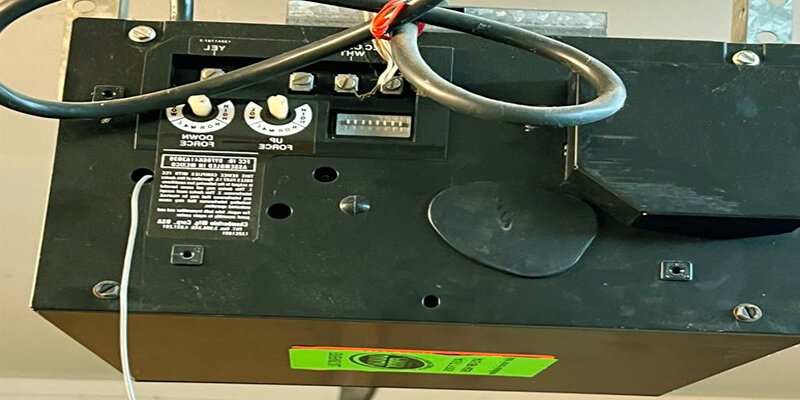
Garage door opener motor unit showing where programming controls are located

Where Is the Garage Door Opener Code Located?

Quick answer: On many modern garage door openers, there is no single permanent code printed on the motor. Remotes and keypads are usually paired through a Learn or Program button, while a keypad PIN is created during programming.

On older garage door opener systems, you may find switches, labels, or model-specific information inside the remote, receiver, or opener housing.

Modern openers usually work differently.

Instead of entering a permanent code printed on the opener, many systems use rolling-code technology and a garage door opener Learn button to pair approved remotes, keypads, or vehicle controls.

For keypad access, you normally create your own PIN during programming rather than looking for a factory PIN printed on the motor.

That is why the owner's manual and opener model number are more useful than searching the unit for a single universal code.

Code Type Keypad PIN

A personal number entered on the exterior keypad to operate the garage door.

Code Type Remote Pairing

Modern remotes are generally paired with the opener through its Learn or Program function.

Code Type Opener Memory

The opener stores authorized remotes, keypads, and sometimes vehicle controls that have been programmed to it.

Where Is the Learn Button on a Garage Door Opener?

The Learn or Program button is usually located on the garage door opener motor unit mounted near the ceiling.

Look at the rear, side, or underside of the opener.

You may need to remove or open a light lens to see it.

For LiftMaster openers, the manufacturer says the Learn button is generally located under the light cover on the same side as the antenna. The button color can vary by opener generation.

Genie states that its Learn or Program button can be located on the opener cover or underneath a lens, depending on the model. Some older Genie openers use a round Learn Code button, while newer models may use a Program/Set button.

Important: If you cannot identify the button, check the opener model label and use the manufacturer's instructions for that specific unit.

Garage door opener Learn or Program button on the motor unit

What Does the Garage Door Opener Learn Button Do?

The Learn button puts the opener into programming mode.

During that short programming window, the opener can accept a signal from a compatible remote, keypad, or vehicle system.

This allows the opener to recognize which devices are authorized to operate the garage door.

On many systems, pressing and releasing the Learn button starts programming mode. Holding the button for a longer period may perform a different function, such as clearing saved remotes.

Do not assume a long press is the correct programming method. Button functions and timing vary by opener model.

Genie specifically warns that holding a Learn button too long on some systems can erase existing programmed devices.

How Does Garage Door Opener Programming Work?

Garage door opener programming usually involves pairing a remote or keypad with the receiver inside the opener.

The basic process on many modern systems is:

  1. Identify the opener brand and model.
  2. Locate the Learn or Program button.
  3. Put the opener into programming mode.
  4. Activate the remote or enter the keypad PIN.
  5. Wait for the opener light or indicator to confirm pairing.
  6. Test the device with the garage area clear.

Model-specific instructions matter: The exact sequence and timing depend on the opener. Different brands and even different models from the same manufacturer can use different programming procedures.

For example, Genie uses different programming procedures depending on whether the unit has a newer Program/Set button or an older Learn Code button.

Always use the instructions for your opener and accessory rather than assuming one programming method works for every brand.

Garage door remote and keypad being programmed with a garage door opener

How Do You Change a Garage Door Opener Code?

If by “code” you mean the keypad PIN, changing it normally involves putting the opener or keypad into programming mode and entering a new personal PIN.

This can be useful after moving into a home, giving temporary access to someone, replacing a keypad, or when you no longer want an old PIN to work.

Supreme's garage door keypad programming and troubleshooting guide explains how keypad pairing and PIN setup generally work across modern systems.

PIN tip: Avoid using simple PINs such as repeating numbers or easy sequences.

If your keypad no longer accepts the code even after reprogramming, the battery, keypad, receiver, or compatibility may need to be checked.

When Should You Reset a Garage Door Opener Code?

You may want to reset a garage door opener code or clear programmed devices when:

  • A remote has been lost or stolen
  • You move into a previously occupied home
  • An old keypad or remote should no longer have access
  • You install replacement remotes
  • Programming has become corrupted
  • You want to rebuild the authorized-device list

A full opener reset is different from simply changing a keypad PIN.

Depending on the opener, clearing the receiver memory can remove all stored remotes and keypads. You would then need to program the devices you still want to use.

Supreme has a separate garage door opener reset guide covering this process in more detail.

Does Resetting the Opener Delete Every Remote?

It can.

On many openers, clearing the opener memory removes previously paired remotes, keypads, and sometimes vehicle controls.

This is why it is important to distinguish between:

Option Change a Keypad PIN

Updates the personal entry code used on the exterior keypad.

Option Program a New Remote

Adds or pairs another authorized transmitter with the opener.

Option Clear Opener Memory

Removes saved devices from the receiver and may require desired controls to be programmed again.

Check the model instructions first. Holding the Learn or Program button for an extended period may clear stored devices on some openers.

What If the Remote Will Not Program?

If a remote will not connect, start with the simple checks.

Confirm that the remote is compatible with the opener and has a good battery. Make sure you are using the correct programming procedure for the opener's Learn button type.

The opener may also have reached its stored-device limit, or the receiver may have a fault.

If multiple remotes or the keypad suddenly stop connecting, the issue may be with the opener rather than each individual accessory.

Supreme's garage door opener repair service covers remote, keypad, receiver, wiring, motor, and control problems when normal programming does not solve the issue.

What If You Cannot Find the Learn Button?

First, locate the model number on the opener housing.

The manufacturer's manual can show the correct button location and programming sequence for that exact model.

Do not confuse force-adjustment controls, travel-limit buttons, or wiring terminals with the Learn button.

If the opener is older, the programming controls may be behind a light lens or located on an external receiver.

Genie notes that some systems use an external receiver mounted on or near the opener, while LiftMaster advises checking behind the light cover or panel.

If you still cannot identify the correct control, professional help can prevent accidental clearing of all programmed devices.

Garage door opener model label Learn button remote and keypad for programming

Can You Reset the Code Without Resetting the Whole Opener?

Often, yes.

If your goal is only to change the keypad PIN, you may not need to erase all remotes.

A keypad reprogramming procedure can update the personal entry code while leaving other devices connected.

If your concern is a lost remote, however, clearing the opener's stored remote memory may be the better security step because the missing remote could still operate the garage door.

The correct choice depends on which device you are trying to remove or change.

When Should You Call a Garage Door Professional?

Professional service can help when the opener will not enter programming mode, the Learn button does not respond, remotes repeatedly lose their connection, or the keypad still fails after proper reprogramming.

You may also need help if the issue appears to involve wiring, the receiver, logic board, or another internal opener component.

Safety note: Avoid opening the motor housing or attempting internal electrical repairs.

If programming problems continue, garage door opener repair can determine whether the problem comes from the remote, keypad, receiver, or opener itself.

Conclusion

A garage door opener code may refer to a keypad PIN, a paired remote, or the programming system built into the opener. On most modern systems, the Learn or Program button is the key to adding or removing authorized devices rather than finding a universal printed code.

Start by identifying the opener brand and model, then use the manufacturer's instructions for the correct Learn button location and programming sequence. If you only need to change a keypad PIN, a full opener reset may not be necessary. If a remote has been lost, clearing stored devices may be more appropriate depending on the opener.

If the opener will not accept a remote, keypad, or new code after proper programming, the problem may involve the receiver, controls, wiring, or opener itself.

Need Help With Garage Door Opener Programming?

Get professional help with garage door remotes, keypads, Learn buttons, and opener programming throughout Dallas-Fort Worth.

Schedule Garage Door Service