 Skip to content


If you need to know how to reset a Craftsman garage door opener, start by checking whether the problem is with a remote, keypad, or saved access code. A reset can clear old codes and let you pair the devices you still use. This guide also shows when a reset will not help and the opener may need repair.

Quick Answer: The basic process for how to reset a Craftsman garage door opener is simple on many models. Press and hold the Learn button for about six seconds, or until the indicator light turns off. This clears saved remote and keypad codes. You must then program the remotes and keypads you want to keep. Controls differ by model, so check the model number and owner's manual before changing other settings.
Reset the opener when the problem is with a remote, keypad, or saved code. It will not fix broken garage door parts.
Common reasons to reset the opener include:
A reset will not repair mechanical problems. Broken springs, damaged cables, worn gears, bad wiring, and off-track doors need proper repair. A reset will not fix these problems.
Older Craftsman models may use different controls. See Supreme's Craftsman garage door opener page for model and service information.
Before you follow these steps for how to reset a Craftsman garage door opener, close the garage door. Keep people, pets, vehicles, and objects away from the door's path.
Safety Reminder: Do not adjust springs, cables, or bottom brackets. These parts are under high tension.
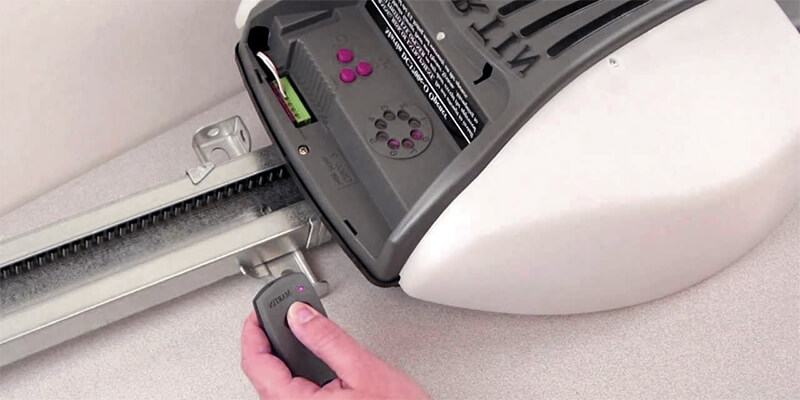
Find the opener motor above the garage door. Look near the antenna wire or under the light cover. The button may say Learn, Smart, or SRT.
Press and hold the Learn button until its light turns off. On many Craftsman models, this takes about six seconds. This removes the saved remote and keypad codes.
Press and release the Learn button. You now have a short time to pair the remote. Within about 30 seconds, press and hold the button you want to use.
Release the remote button when the opener light flashes. Some units click instead. That means the opener saved the code.
Repeat the steps for each remote or keypad you want to use. A full reset removes the old saved devices.
Stand where you can see the garage door. Test each remote one at a time. The door should open and close smoothly.
Press and release the opener's Learn button. Then press the button on the remote during the pairing window. The opener light should flash. Some units may click instead.
This adds the remote to the opener's memory. Do not hold the Learn button too long. Holding it for several seconds can clear all saved remotes and keypads.
If you only bought a new remote, you may not need a full reset. You can often pair the new remote without removing the others. Reset the memory only if you also need to remove an old or missing remote.
Make sure the remote matches your opener. Older and newer Craftsman units may use different systems. Learn more about garage door opener remote services before you replace the whole opener.
After you clear the opener's memory, you usually need to pair the keypad again.
On many Craftsman systems, press and release the Learn button. Enter your PIN on the keypad during the pairing window. Then use the keypad's Enter button.
The opener light may flash when the PIN is saved. Some units may click. Steps can differ by model, so check the manual for your opener and keypad.
For more help, read Supreme's garage door keypad programming and troubleshooting guide.

A reset only changes saved codes. It will not fix every garage door opener problem.
Check the remote pairing, battery, lock mode, and radio interference. Make sure the remote also matches your opener.
Make sure the motor unit has power. Check the plug and breaker. If both are fine, the opener may have an internal problem.
Check the safety sensors for dirt, objects, or poor alignment. Never bypass the sensors to force the door closed.
Stop using the opener again and again. The cause may be worn gears, a loose trolley, broken springs, damaged cables, or another door problem.
If you are learning how to reset a Craftsman garage door opener after a power issue, remember one key point. Unplugging the unit usually does not clear its saved remote codes.
Unplugging the opener may restart the unit. Saved remotes usually stay in memory. To remove an old remote, use the Learn-button reset steps for your model.
A power cycle may fix a short-term glitch. It does not replace the right reset steps or a needed repair.
Yes. Clear the saved remote codes if a garage door remote is lost or stolen. This helps block the missing remote from opening the door.
After the reset, pair only the remotes and keypads you still use. The lost remote should no longer work once its saved code is gone.
Lost Remote? Clear the opener memory before pairing the replacement.
If pairing works for a while and then fails again, the opener may have another problem.
A weak battery or radio noise can cause poor response. Bad wiring, sensors, the receiver, or the control board can also fail. Strange sounds or uneven door movement may point to a door problem. If the issue keeps coming back, garage door opener repair may be the right next step.
Do not adjust garage door spring tension yourself. Garage door springs and cables are under high tension. Do not adjust them without the right tools and training.
Supreme Garage Door Repair serves homes and businesses across North Texas. A technician can check the remote, keypad, sensors, wiring, opener, and door. See our North Texas service areas or contact our team if the opener still will not respond.
On many Craftsman openers, hold the Learn button for about six seconds. Release it when the light turns off. This usually clears saved remote and keypad codes. Check your manual because steps can differ by model.
Usually, yes. A full memory reset removes the saved remotes and keypads. Pair the devices you still use after the reset.
Often, yes. Press and release the Learn button, then pair the new remote. You do not need to clear all codes just to add one remote. Use a full reset when you need to remove a lost or old remote.
The remote must be paired again after a full reset. If it still does not work, check the battery and wall-control lock mode. Also make sure the remote matches the opener. Radio noise or a bad receiver may also be the cause.
Usually, no. A power outage does not clear the saved remote codes. If a remote stops working after an outage, check the power and remote first. Do a full reset only if you need to clear the saved devices.
If you tried the steps for how to reset a Craftsman garage door opener and the problem keeps coming back, have a technician check the system. Get help if the motor runs but the door does not move. Also call if the door moves unevenly, the sensors keep failing, or parts look damaged.
Resetting a Craftsman garage door opener can help when you need to clear old remote codes, reconnect a keypad, program a replacement remote, or remove access from a lost device. Use the Learn button instructions for your specific Craftsman model and reprogram the devices you still want to use after clearing the opener memory.
If the opener continues to lose programming, the motor runs without moving the door, or the garage door moves unevenly, the problem may require more than a reset. Wiring, sensors, opener components, springs, cables, or other garage door parts may need professional inspection.
Supreme Garage Door Repair provides opener inspection, repair, replacement, and installation for homeowners and businesses across North Texas.
Schedule Garage Door Opener Service