 Skip to content


Need to know how to reset a garage door opener? This guide shows the main steps. You will learn how to clear saved codes, reconnect remotes and keypads, and spot signs that need repair.
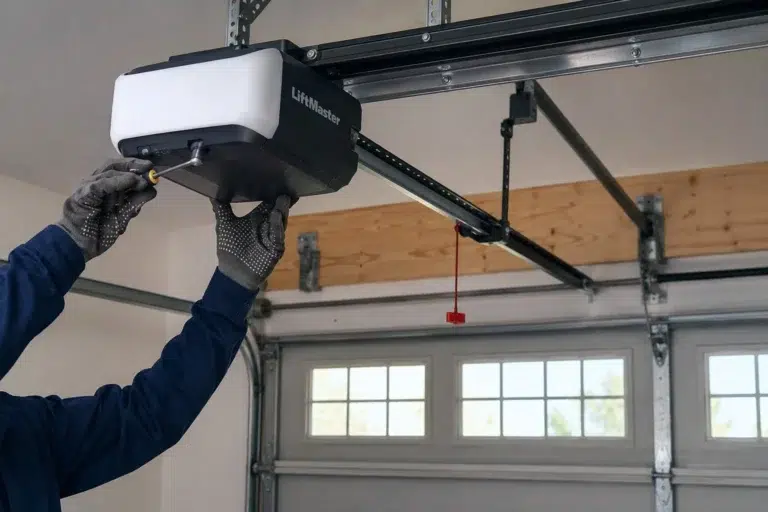
Quick Answer: Many newer openers have a Learn or Program button on the motor unit. Holding it for the time listed in the manual may clear saved remotes and keypads. After that, pair the devices you still use. Steps vary by brand and model, so check the owner's manual before you clear the opener memory.
A garage door opener can stop after a remote change, power loss, or setting error. Learning how to reset a garage door opener can often restore normal use. It will not fix a damaged door or worn parts. Supreme Garage Door Repair can help when the issue is not a simple setting.
The reset steps depend on the brand and model. Some units use a Learn button. Others use a Program or Reset button.
Check the owner's manual before you clear any settings. A full reset may remove remotes, keypads, or car controls that were saved before.
A reset helps when saved access codes need to be cleared or added again. It does not repair a broken garage door or worn hardware.
Common reasons to reset or reprogram an opener include:
A power outage does not always require a full reset. Turn the power back on first. Then test the wall button and remote before you erase saved codes.
Programming and mechanical problems are different. If the motor runs but the door does not move well, the problem may be in the door, spring, cable, trolley, or other hardware. For opener-only issues, see Supreme's garage door opener repair service page.
Most newer openers have a Learn, Program, or similar button on the motor housing. The button name and reset steps vary by brand.
Before You Begin: Close the door. Keep people, pets, cars, and objects away while you program and test the opener.
Start with the garage door fully closed. Keep the door path clear.
Find the motor unit near the garage ceiling. Open the light cover if needed to find the Learn, Program, or Reset button.
Check the manual before you hold any button. On many units, a quick press starts pairing. A longer press can erase saved devices.
Use the reset steps listed for your model. A light may turn off or flash when the saved codes are cleared.
Put the opener in pairing mode. Then press the button on the remote as shown in the manual.
For additional help with pairing a remote rather than clearing the entire opener memory, read Supreme's How to Program Garage Door Opener Remote guide.
A full reset may remove other remotes, keypads, car controls, or smart devices. Pair each device you still use.
Stand where you can see the door. Test each remote or keypad one at a time. Make sure the door opens and closes as it should.
If you are only replacing one remote, you may not need to clear every saved device. Check the remote first, then use the garage door opener remote service guide for additional pairing information.
Resetting and pairing are related, but they are not the same. If you know how to reset a garage door opener, you should also know when a full reset is not needed.
A full reset clears some or all saved access codes.
Pairing adds one remote or device without clearing everything else.
One remote stopped working? If the other controls still work, change the remote battery and try pairing it again before you clear the full memory.
Craftsman owners can also read Supreme's Craftsman garage door opener reset guide for brand-specific steps.

A reset cannot fix every opener problem. A few quick checks can show if saved codes are really the cause.
Do not change force or travel settings unless the owner's manual tells you how. Wrong settings can affect safe door movement.
If the opener still fails after a reset and new pairing, the cause may be something other than saved codes.
Check the battery, pairing steps, lock mode, and signal range.
Check power first. A bad wall button, wire, or control board may also be the cause.
Clean the safety sensors and clear the door path. Bad sensor aim or wiring can also stop closing.
Stop using the opener. The trolley, drive parts, spring, or other door hardware may be at fault.
The receiver, control board, or power supply may need a service check.
A crooked or very heavy door points to a door problem, not a reset problem.
Stop repeatedly operating the opener if the door looks unsafe. A broken spring or bad cable can make the door very heavy. Do not keep resetting or running the motor.
If basic opener checks do not explain why the garage door will not move, Supreme's garage door does not open troubleshooting guide covers other possible causes.
A full memory reset can remove saved remotes on many opener models. The exact result depends on the brand and model.
If a remote is lost or stolen, clearing the old codes can block that remote. Then pair only the remotes, keypads, and car controls you still use.
A reset can fix saved-code problems. It cannot fix worn parts or repeated power and control failures.
Resetting or reprogramming may be the right choice when the problem involves saved access or device pairing.
Repair may be needed when an opener component, wire, or related part has failed.
Replacement may make more sense when the opener is old, unreliable, or continues to have major problems.
A new opener may add app control, battery backup, or other useful features. The exact features depend on the model. If replacement is the better fit, see Supreme's garage door opener installation page.
Yes. Many homeowners can reset or pair an opener when the issue is limited to remotes, keypads, or saved codes.
Use the steps for your exact model. Do not adjust springs, cables, or door balance while you work on opener settings.
Safe opener checks include:
Leave these mechanical repairs to a technician:
Supreme Garage Door Repair provides garage door opener troubleshooting and repair throughout North Texas, including Dallas, TX and Fort Worth, TX.
If basic checks, resetting, and reprogramming do not solve the problem, the opener or another part of the garage door system may need professional inspection.
Knowing how to reset a garage door opener can solve many remote, keypad, and saved-code problems. It will not fix worn gears, bad wires, broken springs, damaged cables, or an uneven door.
Supreme Garage Door Repair serves North Texas service areas. If the basic checks do not solve the problem, contact Supreme Garage Door Repair for help.
Check the manual for your model first. Many newer openers use a Learn or Program button. A longer press may clear saved codes. Pair the remotes and keypads you still use after the reset.
Usually not. Unplugging the opener may restart its power, but saved remote codes often stay in memory. Use the maker's reset steps if you need to clear those codes.
A full memory reset can remove saved remotes on many openers. Some models may also clear keypads or car controls. Check the manual before you erase the memory.
A reset clears some or all saved codes. Pairing, or reprogramming, adds a remote, keypad, or other device. You may not need a full reset if only one remote has stopped working.
Not always. Turn the power back on and test the wall button and remotes first. If they still work, there is no need to clear the memory.
A full reset may have removed the remote from memory. Pair it again using the steps for your opener. If it still fails, check the battery, lock mode, signal range, and remote compatibility.
Knowing how to reset a garage door opener can solve many remote, keypad, and saved-code problems. Start by checking the power, remote battery, and basic opener controls. Then follow the reset or pairing instructions for your exact brand and model.
A reset will not fix worn gears, broken springs, damaged cables, faulty wiring, or an unsafe garage door. If basic programming and troubleshooting do not restore normal operation, Supreme Garage Door Repair can inspect the system and determine whether the opener needs repair or replacement.
Supreme Garage Door Repair provides opener inspections, repair, replacement, installation, programming assistance, and related garage door services across North Texas.
Schedule Garage Door Opener Service