 Skip to content


Garage Door Learn Button Colors Explained: What Each Color Means
Garage door learn button colors can help identify the security system, radio technology, and compatible remotes used by many Chamberlain, LiftMaster, and Craftsman garage door openers.
The most common colors are white, yellow, purple or brown, red or orange, and green.
The color does not simply tell you where to press. It can help determine which replacement remote or keypad will work with your opener.
Before buying a new remote, check the Learn button on the motor unit and compare the color with the opener manufacturer's compatibility information.
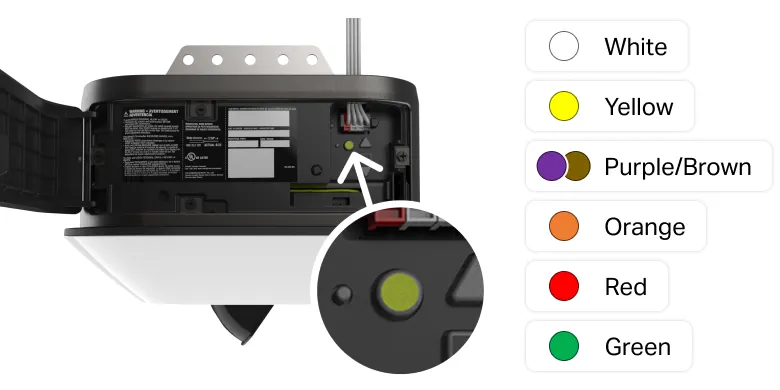
What Do Garage Door Opener Learn Button Colors Mean?
Quick answer: On many Chamberlain and LiftMaster systems, Learn button color helps identify the opener's communication technology, security generation, frequency information, and compatible replacement remotes.
On many Chamberlain and LiftMaster systems, the Learn button color identifies the opener's communication technology and generation.
Current Chamberlain compatibility information groups the colors this way:
| Learn Button Color | System / Technology | Frequency Information |
|---|---|---|
| White | Security+ 3.0 / E Code | BLE LR 2.4 GHz |
| Yellow | Security+ 2.0 / E Code | 315 MHz or 390 MHz |
| Purple / Brown | Security+ / D Code | 315 MHz |
| Red / Orange | Security+ / D Code | 390 MHz |
| Green | Billion Code CGI | 390 MHz |
Chamberlain currently uses these classifications when determining whether replacement remotes are compatible with an opener.
This is why identifying the button color is often more useful than choosing a remote based only on appearance.
Where Is the Learn Button on a Garage Door Opener?
The Learn button is normally located on the garage door opener motor unit mounted near the ceiling.
Depending on the model, it may be:
- On the back or side of the opener
- Near the antenna wire
- Under or behind the light cover
- Beside wiring terminals or programming controls
Look for a small colored button labeled LEARN, LEARN CODE, or a similar programming term.
Do not confuse the Learn button with travel-limit, force-adjustment, or door-control buttons.
Supreme's broader guide to the garage door opener code and Learn button explains how Learn-button programming differs from keypad PINs and other opener codes.

What Does a White Learn Button Mean?
A white Learn button garage door opener generally indicates newer Chamberlain or LiftMaster technology using Security+ 3.0.
LiftMaster currently lists white-button systems as using Security+ 3.0, BLE LR 2.4 GHz, and E Code communication.
This is a newer system than the yellow Security+ 2.0 generation.
Remote compatibility still needs to be checked carefully because a remote designed only for older Security+ systems may not work with a white-button opener.
White button: Confirm that the replacement remote or keypad specifically lists compatibility with Security+ 3.0 or your exact opener model.
What Does a Yellow Learn Button Mean?
A yellow Learn button garage door opener is associated with Security+ 2.0 technology.
Chamberlain's current compatibility chart lists yellow-button openers with Security+ 2.0 and E Code communication at 315 MHz or 390 MHz.
This is why the phrase Security+ 2.0 Learn button is commonly associated with yellow.
Many newer Chamberlain, LiftMaster, and compatible Craftsman openers use this system.
The yellow button is especially important when choosing accessories because some current remotes specifically require a yellow-button opener for certain features.
Compatibility note: Do not assume every modern remote will work simply because the opener and remote are from the same brand. Check the product compatibility chart first.
What Does a Purple Learn Button Mean?
A purple Learn button garage door opener generally indicates an older Security+ system operating at 315 MHz.
Chamberlain currently groups purple and brown Learn buttons together under Security+ 315 MHz D Code compatibility.
If your opener has a purple button, look for a replacement remote that explicitly supports purple-button Security+ systems.
Some universal remotes support this generation, while other newer remotes are designed only for newer yellow or white-button technology.
The color provides a fast way to narrow down the correct remote family before programming begins.
What Does a Red or Orange Learn Button Mean?
A red orange Learn button garage door opener generally uses an older Security+ system operating at 390 MHz.
Current Chamberlain compatibility information identifies red and orange buttons as Security+ 390 MHz D Code systems.
Red and orange are usually treated as the same compatibility category rather than two completely different opener generations.
If you are replacing a lost or damaged remote, look for products that specifically list red/orange Learn-button compatibility.
Using the opener model number along with the button color provides an even more reliable match.
What Does a Green Learn Button Mean?
A green Learn button garage door opener generally indicates an older Billion Code system.
Chamberlain's current universal remote compatibility chart lists green-button systems as Billion Code CGI at 390 MHz.
These systems are older than Security+ 2.0 and Security+ 3.0.
Because of their age, it is especially important to verify whether a current replacement remote still supports the green-button system before buying it.
A universal remote may support green-button openers, but compatibility should be confirmed from the manufacturer's specifications.

Does the Learn Button Color Tell You the Garage Door Opener Frequency?
Often, yes, but not always by color alone.
For several older Chamberlain and LiftMaster generations, the color is closely associated with a specific garage door opener frequency.
Commonly associated with Security+ systems operating at 315 MHz.
These systems are associated with 390 MHz in current compatibility information.
Yellow may use 315 MHz or 390 MHz E Code, while white introduces Security+ 3.0 and BLE LR 2.4 GHz technology.
Yellow Security+ 2.0 systems are different because current Chamberlain compatibility data lists both 315 MHz and 390 MHz E Code configurations.
White-button Security+ 3.0 systems introduce newer wireless technology, including BLE LR 2.4 GHz.
Use button color as a compatibility clue, not as the only technical specification. The opener model and remote manufacturer's compatibility information are still important.
How Do Learn Button Colors Affect Remote Compatibility?
Garage door opener remote compatibility depends on the opener's communication system, frequency, security generation, and the remote itself.
Two remotes that look nearly identical may support different opener generations.
For example, Chamberlain's current universal remote supports:
- White Security+ 3.0 systems
- Yellow Security+ 2.0 systems
- Purple or brown Security+ systems
- Red or orange Security+ systems
- Green Billion Code systems
The same product also supports several non-Chamberlain opener brands using different frequencies and coding systems.
Before purchasing a remote, check both the Learn-button color and opener model number.
If the remote manufacturer provides a compatibility chart, use that chart rather than relying on color alone.
Can the Same Learn Button Color Appear on Different Models?
Yes. The Learn-button color identifies a technology family, not one specific garage door opener model.
Many opener models can use the same button color because they share the same communication platform.
That means a yellow button does not tell you the exact opener model. It mainly tells you that the opener belongs to a compatible Security+ 2.0 family.
The model number is still useful when checking:
- Remote compatibility
- Keypad compatibility
- Wall-control compatibility
- Replacement parts
- Programming instructions
Combining the model number and Learn-button color gives you a much more reliable match than either detail alone.
Should You Buy a Remote Based Only on Learn Button Color?
No. Learn-button color is a useful starting point, but always confirm the remote manufacturer's compatibility specifications.
This is especially important with newer white-button systems and older green-button systems.
Universal remotes may support several Learn-button generations, while some manufacturer-specific remotes support only certain systems.
If you already purchased a remote that will not program, first confirm compatibility before repeatedly resetting the opener.
Supreme's garage door opener repair service can also diagnose remote, receiver, keypad, wall-control, and opener problems when normal programming does not work.

What If Your Learn Button Color Does Not Match This List?
Not every garage door opener uses the Chamberlain or LiftMaster color system.
Genie, Linear, Wayne Dalton, Guardian, Sommer, and other manufacturers use their own programming technologies and compatibility rules.
Important: A colored button on another brand should not automatically be interpreted using the Chamberlain chart.
Check the opener manufacturer and model label first.
Then use the manufacturer's documentation for programming and remote compatibility.
This prevents buying a remote based on the wrong system.
Conclusion
Understanding garage door opener Learn button colors can make it much easier to select the correct remote or keypad. For Chamberlain, LiftMaster, and many Craftsman systems, white, yellow, purple or brown, red or orange, and green buttons correspond to different generations of opener technology.
The button color is useful, but it should always be checked alongside the opener model and the remote manufacturer's compatibility information. A matching color can narrow down the correct remote family, but it does not identify one exact opener model or guarantee that every remote in that family will work.
If a remote still will not program after compatibility has been confirmed, the problem may involve the remote, keypad, receiver, wall control, or opener itself.
Need Help With Garage Door Opener Compatibility?
Get professional help identifying Learn-button systems, remote compatibility, and garage door opener problems throughout Dallas-Fort Worth and North Texas.
Schedule Garage Door Service